Defining Routes
Meet the next generation of documentation. AI-native, beautiful, out-of-the-box, and built for developers and teams.
Defining Routes
We recommend reading the Routing Fundamentals page before continuing.
This page will guide you through how to define and organize routes in your Prisma PHP application.
Creating Routes
Prisma PHP uses a file-system based router where folders are used to define routes. Each folder represents a route segment that maps to a URL segment. To create a nested route, you can nest folders inside each other.
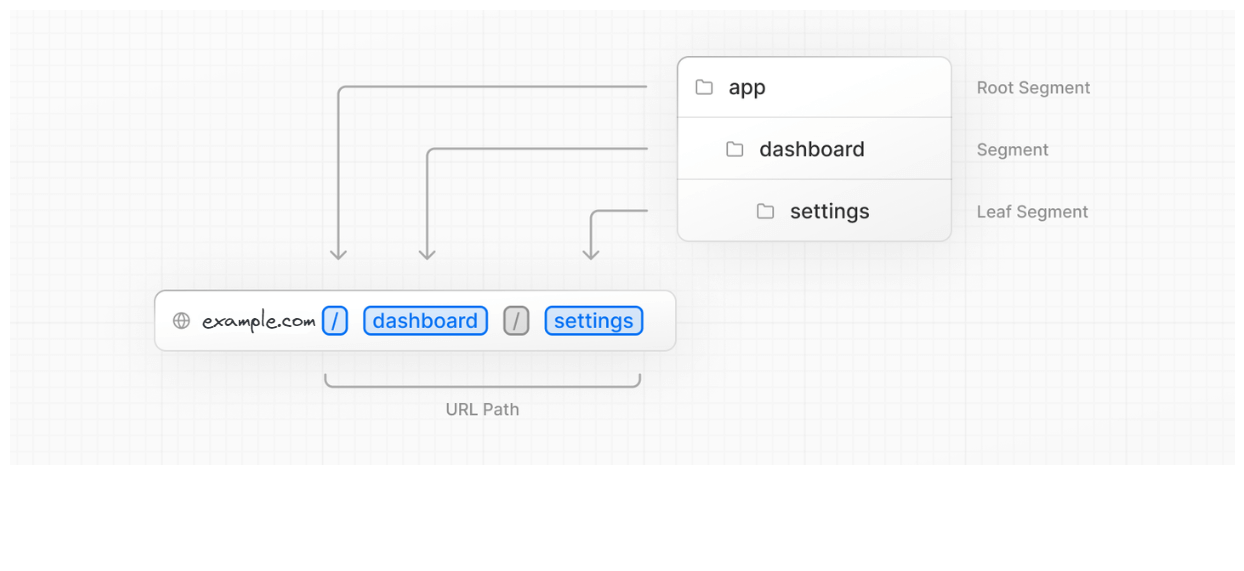
A special index.php file is used to make route segments publicly accessible.
Note: The index.php file is the default file that will be executed when a route is accessed.
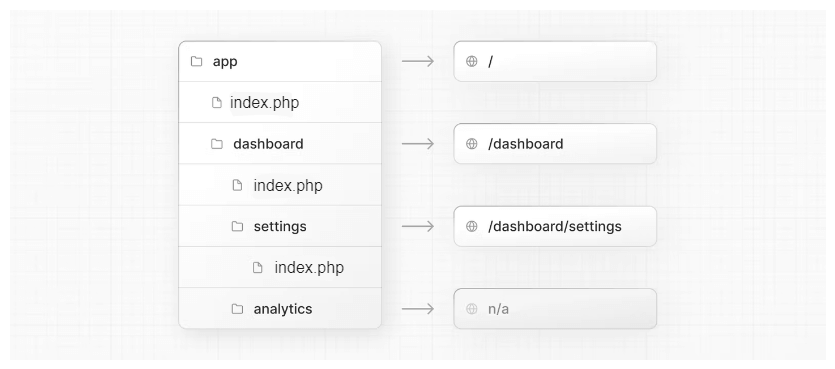
In this example, the /dashboard/analytics URI path is not publicly accessible
because it does not have a corresponding index.php file. This folder could be
used to store components, stylesheets, images, or other colocated files.
Creating UI
Special file conventions are used to create UI for each route segment. The most common are index to show UI unique to a route, and layouts to show UI that is shared across multiple routes.
Copy and paste the code below to your index.php file.
This code will display a simple "Hello, World!" message on the screen.
    <?php
    echo "Hello, World!";
    ?>